



Solved

Embedd Dashboards in iFrames without ODS header

  • July 3, 2024
  • 7 replies
  • 109 views

Johannes Hool
Forum|alt.badge.img+2

Hey there

When we want to embed a table in an iframe we have the /embed/ endpoint that we can use to hide the ODS header when displaying the dataset. Here is an example:

Table with header:
https://data.bl.ch/explore/dataset/12060/table/?disjunctive.jahr&disjunctive.gemeinde&disjunctive.kategorie&disjunctive.einheit

Table without header
https://data.bl.ch/explore/embed/dataset/12060/table/?disjunctive.jahr&disjunctive.gemeinde&disjunctive.kategorie&disjunctive.einheit

We are currently trying to embed a dashboard created with the studio in an iframe. However, we can’t get rid of the header. Example:

Dashboard with header:
https://data.bl.ch/p/wahlen_nr_sr/

Dashboard without header:

?


Is there a possibility to achieve this? If yes, how?


Many thanks for your help

Auto-translation 🪄

Salut. Lorsque nous voulons intégrer une table dans une iframe, nous avons le point de terminaison /embed/ que nous pouvons utiliser pour masquer l'en-tête ODS lors de l'affichage de l'ensemble de données. Voici un exemple :Tableau avec en-tête :https://data.bl.ch/explore/dataset/12060/table/?disjunctive.jahr&disjunctive.gemeinde&disjunctive.kategorie&disjunctive.einheitTableau sans en-têtehttps://data.bl.ch/explore/ embed/dataset/12060/table/?disjunctive.jahr&disjunctive.gemeinde&disjunctive.kategorie&disjunctive.einheitNous essayons actuellement d'embarquer un tableau de bord créé avec le studio dans une iframe. Cependant, nous ne pouvons pas nous débarrasser de l’en-tête. Exemple : Tableau de bord avec en-tête :https://data.bl.ch/p/wahlen_nr_sr/Tableau de bord sans en-tête :? Y a-t-il une possibilité d'y parvenir ? Si oui, comment ? Merci beaucoup pour votre aide

Best answer by Benwa

Hello Johannes,

In fact, there are two ways of displaying Code Editor pages: one within the Funnel – that is, from the Catalogue page right through to the Asset being used – and a separate display mode (particularly for structural pages such as the Home Page or content pages).

To do this, the URL is the same as before; using your example: https://data.bl.ch/page/motorfahrzeugbestand 

So, by adding the parameter headless=true, you’ll see the previous behaviour: https://data.bl.ch/page/motorfahrzeugbestand?headless=true 

7 replies

  • July 4, 2024

Hello Johannes, 

You can use the parameter “headless=true” in the URL, for example https://data.bl.ch/p/wahlen_nr_sr/?headless=true

Hope it helps ! 

Auto-translation 🪄

Bonjour Johannes, Vous pouvez utiliser le paramètre « headless=true » dans l'URL, par exemple https://data.bl.ch/p/wahlen_nr_sr/?headless=trueJ'espère que ça aide ! 

Johannes Hool
Forum|alt.badge.img+2

Hi Carole

You guys are the best. :-)

Thank you very much!

Auto-translation 🪄

Salut Carole, vous êtes les meilleurs. :-)Merci beaucoup!

Johannes Hool
Forum|alt.badge.img+2

Hello everyone

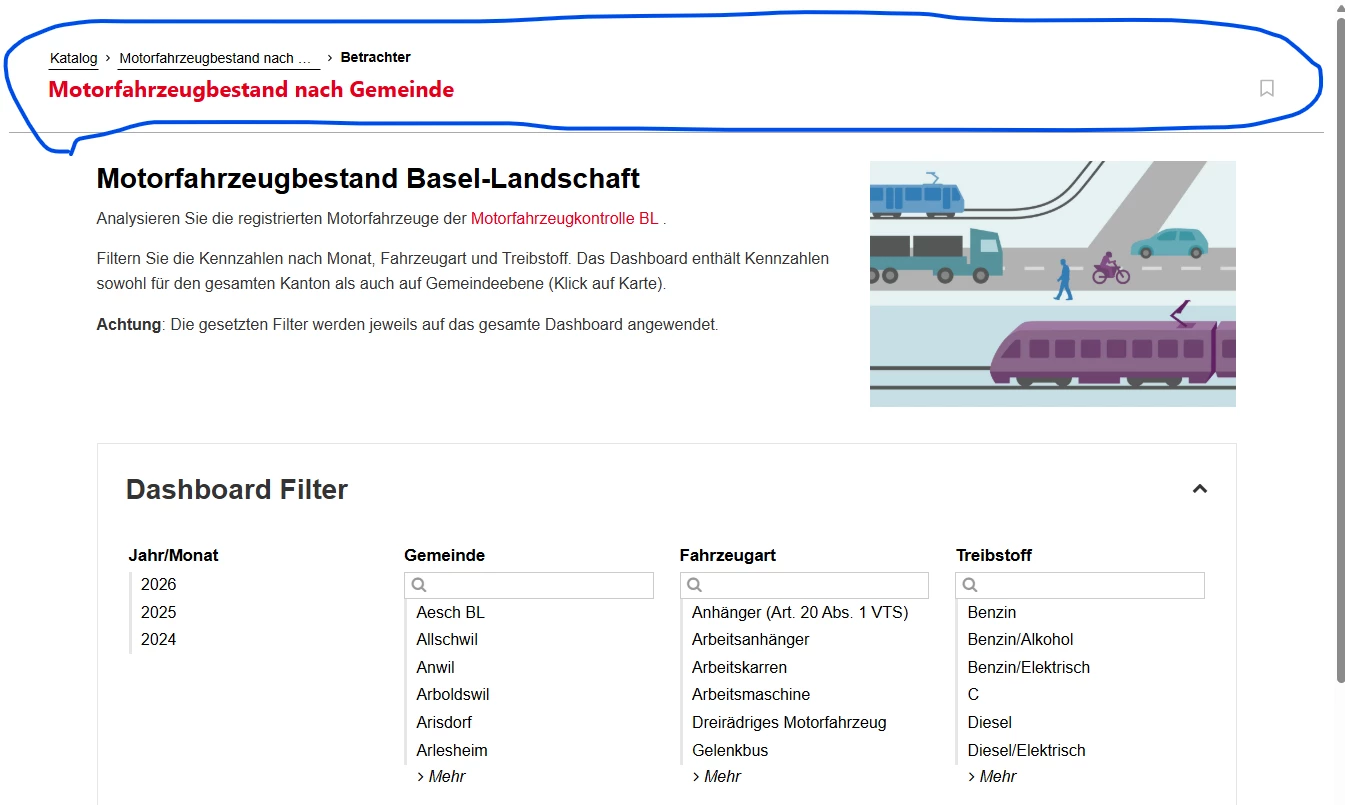
It seems that with the new Marketplace Experience there is a new element on a page when it is shaered using the headless=true parameter. You can see it here:

https://data.bl.ch/explore/assets/motorfahrzeugbestand/view?headless=true


For some cases this navigation element can be great. But I would guess that when shared using the headless=true parameter, the idea is most of the time to hide all the portal specific navigation elements.

Is there a workaround? If not, are you planing to change this behavior at some point?

Many thanks and all the best


Benwa
Huwise Team
Forum|alt.badge.img+3
  • Huwise Team
  • Answer
  • August 18, 2026

Hello Johannes,

In fact, there are two ways of displaying Code Editor pages: one within the Funnel – that is, from the Catalogue page right through to the Asset being used – and a separate display mode (particularly for structural pages such as the Home Page or content pages).

To do this, the URL is the same as before; using your example: https://data.bl.ch/page/motorfahrzeugbestand 

So, by adding the parameter headless=true, you’ll see the previous behaviour: https://data.bl.ch/page/motorfahrzeugbestand?headless=true 


Johannes Hool
Forum|alt.badge.img+2

Hi Benwa
Great. :-)

Just to be sure: this url format (keeping /page/ instead of switching to ---/explore/assets/...) will be kept persistant and not go away at some later point?


Benwa
Huwise Team
Forum|alt.badge.img+3
  • Huwise Team
  • August 18, 2026

Don’t worry – as long as code editor pages remain available, we have no reason to change the way this works.


Johannes Hool
Forum|alt.badge.img+2

Perfect. :-) Thank you