


Solved

How to add a visualization as a "usage" / source reference to a dataset

  • August 10, 2026
  • 2 replies
  • 13 views

boris.djakovic
Forum|alt.badge.img+3

Hello dear community :)

We have created a new visualization here: Veranstaltungen im Raum St. Jakob.

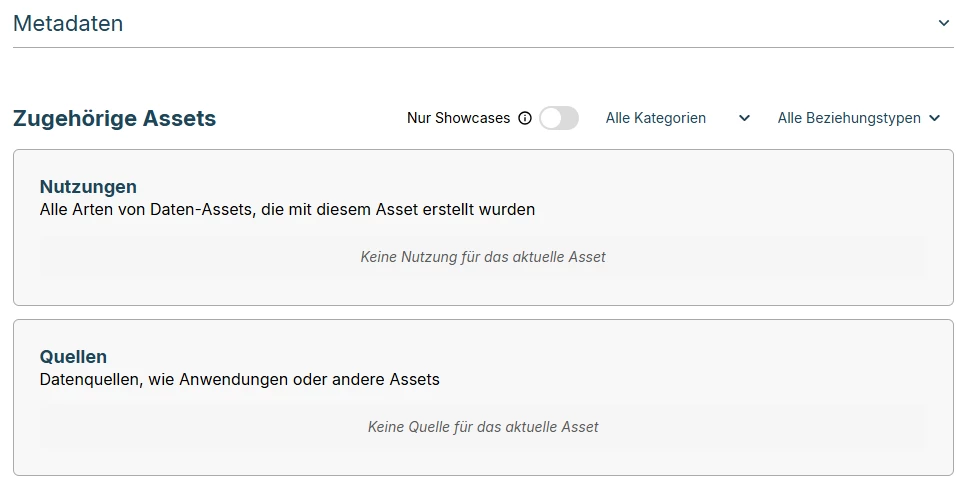
This visualization is based on four other datasets, and we would like to reference it. However, we can't find where or how to add this link/reference.

Could you please let us know how to add our visualization as a source/usage reference on the four original datasets?

Thank you for your help.

Best regards,
Boris
 

Best answer by florine.vm

Hi Boris,

Your visualization is registered as an "Other asset" that was added directly to the catalog, without going through the "Submit a showcase" contribution form. That form is what actually creates the link between a visualization and its source datasets.

To fix it:

1. Go to your data catalog and open the "Submit a showcase" form.
2. Submit your visualization there (title, description, link), making sure to select the four datasets it's based on.
3. Once an admin on your team approves the submission, a new asset will be created automatically, this time correctly linked to the four datasets, and it will show up in their "Usages" section.
4. You can then unpublish or delete the "Other asset" entry you created manually, to avoid having two catalog entries for the same visualization.

I hope this helps!

2 replies

florine.vm
Community Manager
Forum|alt.badge.img+1
  • Community Manager
  • Answer
  • August 11, 2026

Hi Boris,

Your visualization is registered as an "Other asset" that was added directly to the catalog, without going through the "Submit a showcase" contribution form. That form is what actually creates the link between a visualization and its source datasets.

To fix it:

1. Go to your data catalog and open the "Submit a showcase" form.
2. Submit your visualization there (title, description, link), making sure to select the four datasets it's based on.
3. Once an admin on your team approves the submission, a new asset will be created automatically, this time correctly linked to the four datasets, and it will show up in their "Usages" section.
4. You can then unpublish or delete the "Other asset" entry you created manually, to avoid having two catalog entries for the same visualization.

I hope this helps!


boris.djakovic
Forum|alt.badge.img+3

Thank you for the support – I will fix it that way. But I would also like to make a feature request. In the future, an application might be updated and use new data sources, so it would be great to be able to adapt this manually, without having to submit a new showcase each time.

Best regards from Basel 😀