


Solved

Filter by modified -- date range

  • Sep 25, 2026 12:04 AM UTC
  • 3 replies
  • 20 views
  • Translate All

Forum|alt.badge.img+4

We’re currently trying to navigate the new interface in the back office.  There is a filter we were using on a daily basis which we cannot see/find.

We used to be able to filter for Last modified and date range:
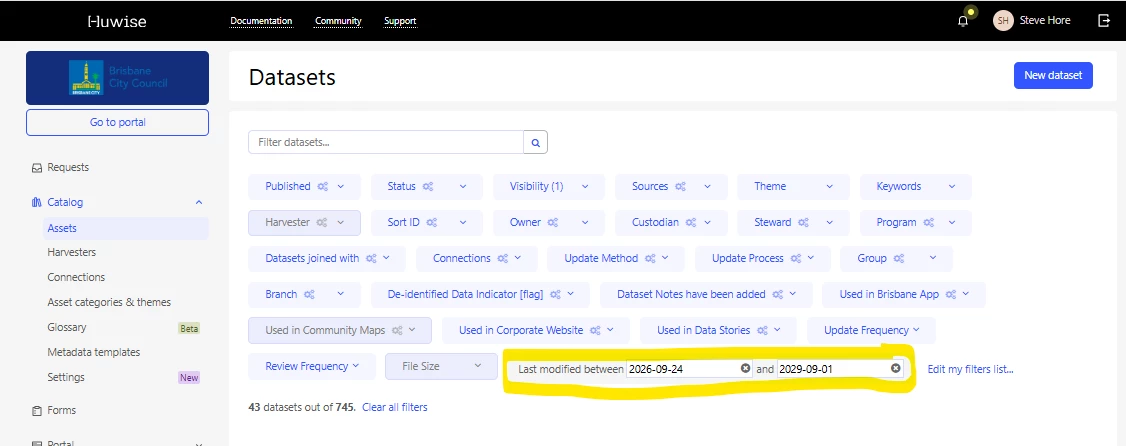

The new experience provides only a single date for selection -- could you reinstate the ability for a range to be selected?  

 

Best answer by Valentine

Hello Yvonne, 

I am happy to tell you that the ability to filter by date range in the asset list has been restored.

Have a nice day.

Valentine

View original

3 replies

Valentine
Huwise Team
Forum|alt.badge.img+1
  • Huwise Team
  • Oct 12, 2026 4:59 PM UTC

Hello Yvonne,

Thank you for your feedback.
We will restore the ability to filter by date range in the asset list of the new experience in the coming weeks.

Valentine

Translate

Valentine
Huwise Team
Forum|alt.badge.img+1
  • Huwise Team
  • Answer
  • Oct 28, 2026 10:46 AM UTC

Hello Yvonne, 

I am happy to tell you that the ability to filter by date range in the asset list has been restored.

Have a nice day.

Valentine

Translate

Forum|alt.badge.img+4
  • Author
  • Guardian
  • Oct 28, 2026 11:12 PM UTC

Hello Yvonne, 

I am happy to tell you that the ability to filter by date range in the asset list has been restored.

Have a nice day.

Valentine

Thank you!!!  :)

Translate